Patient follow-up with WhatsApp reminders for your clinic
Set a follow-up date, and a time if you like, as you close the visit. On a paid plan, Vaidya OS sends the patient a WhatsApp reminder the day before and on the morning of that date. Your dashboard lists who is due and who is overdue, so you know whom to call.
Last reviewed
How a follow-up works in Vaidya OS
Set the date as you close the visit
Pick the follow-up date on the visit screen. Adding a time is optional; without one, the reminder uses your clinic opening hour.
The patient gets a WhatsApp reminder
One reminder goes at 9 AM the day before the follow-up and another at 8 AM on the day. Each names the doctor and carries your clinic phone number.
You see who is due and who is overdue
The dashboard lists follow-ups due today, tomorrow, the day after and over the next 7 days, and groups overdue patients by how late they are.
Every automatic message, and when it goes
These messages go out on their own once you are on a paid plan and have switched WhatsApp sending on. Times are Indian Standard Time.
| Message | When it goes | Who gets it | What it carries |
|---|---|---|---|
| Welcome | When you add a new patient | New patients, one message per phone number | Clinic name, doctor name and clinic phone |
| Appointment reminder | About 24 hours before the visit, at your opening hour or the patient's preferred time | Patients with a booking | Patient name, doctor name, time and clinic phone |
| Appointment reminder, same day | 8 AM on the day of the visit | Patients with a booking | Patient name, doctor name and clinic phone |
| Follow-up reminder | 9 AM the day before the follow-up | Patients with a follow-up date | Patient name, doctor name, time and clinic phone |
| Follow-up reminder, same day | 8 AM on the follow-up day | Patients with a follow-up date | Patient name, doctor name and clinic phone |
The welcome message needs your clinic phone number to be set in Vaidya OS. For how many reminders to send and when, read how many WhatsApp reminders a clinic should send. For the doctor-unavailable notice and QR check-in, see clinic automation at the front desk.
Which number the messages come from
Automatic messages go from Vaidya OS's own WhatsApp business number, not from your phone. Your clinic does not need a WhatsApp Business API account. Every message names the doctor and carries your clinic phone, so a patient who wants to talk can call you. More on this: do you need a WhatsApp Business API account?
Turning reminders on
Automatic messages start once you are on a paid plan and switch WhatsApp sending on in the app. They are not sent during the free trial, but you can set follow-up dates and use the due and overdue lists from day one. Each plan includes a monthly message allowance, shown in the app. See pricing.
Overdue follow-ups: who to call
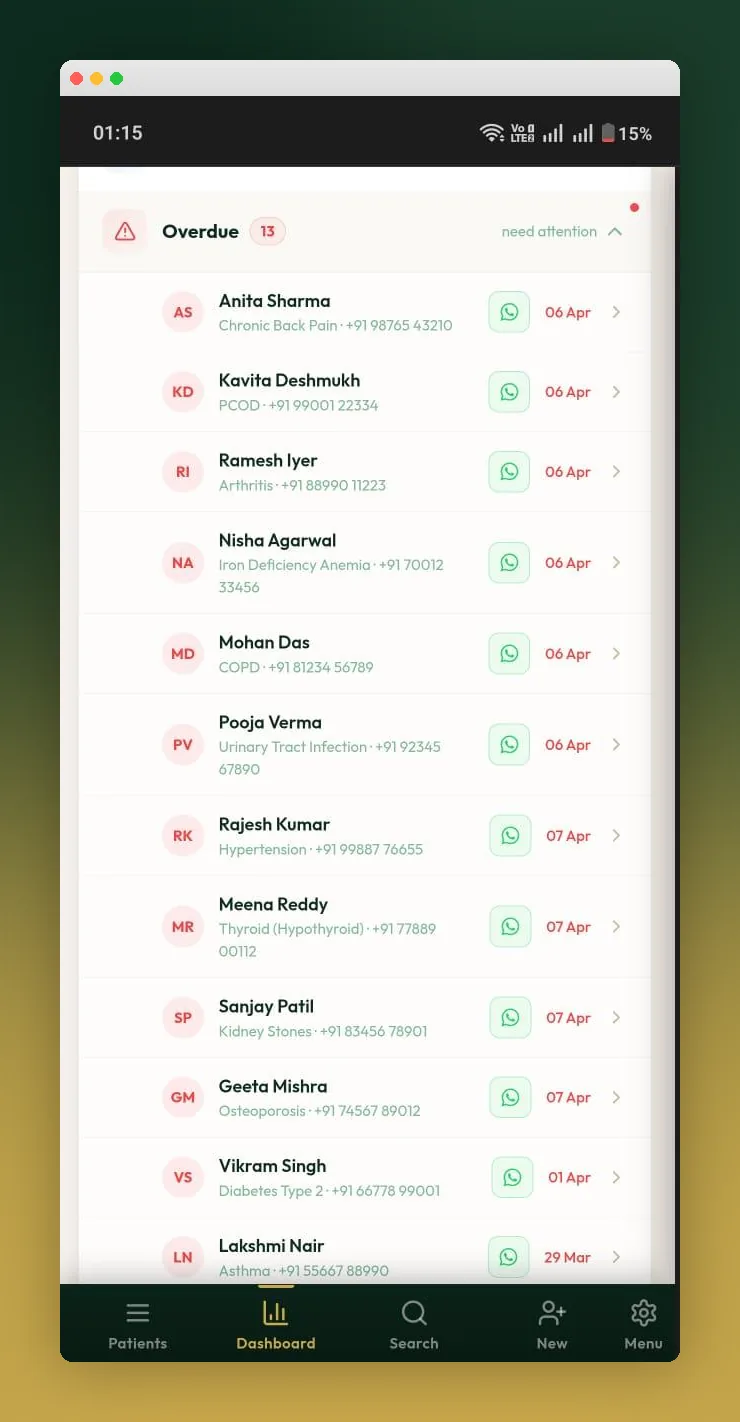
Patients who missed their follow-up are grouped by how late they are: 1 to 3 days, 4 to 7 days, 1 to 2 weeks and over 2 weeks. From the list, one tap opens a ready WhatsApp message to the patient on your phone. The dashboard also shows how many follow-ups were completed, how many are overdue and how many patients have no follow-up set.
For the full method, with a follow-up plan by condition and messages you can copy, read how to follow up with patients. To cut missed appointments, see how to reduce no-show patients.
When a patient does not want messages
If a patient replies STOP, Vaidya OS sends them no more automatic messages. Tell patients at registration that your clinic sends reminders on WhatsApp. For the rules, read is automated WhatsApp legal in India?
A Monday recap in your inbox
On paid plans, you get an email every Monday at 9 AM with the week's visits, new patients and missed appointments.
Is this a CRM for doctors?
Partly. Vaidya OS keeps your patient list, each patient's visit history, follow-up dates and reminders in one place, which is what most clinics need from a doctor CRM. It does not run marketing campaigns, patient tags or segments.
What Vaidya OS follow-ups do not do
- No automatic recall campaigns for patients who have not visited in months. You can win them back on WhatsApp by hand.
- No follow-up modules made for one specialty.
- No automatic rescheduling when a patient is late or cannot come.
- No prescription PDF sent on WhatsApp by Vaidya OS. You download the PDF and share it yourself.
- No email or SMS campaigns.
Who it is for
- A doctor working alone: clinic software for solo doctors.
- A clinic with a front desk: clinic software for small clinics.
- Several doctors sharing one front desk: clinic software for multi-doctor clinics.
See all Vaidya OS features, or how Vaidya OS brings patients back.
Guides
Guides on follow-ups and retention
Reminders & no-shows
Chronic patients
Patient loss & revenue
Common questions about follow-ups
Pricing, data, setup, security and switching, answered clearly.
Clinic management software that records a follow-up date at each visit and reminds the patient. Look for WhatsApp reminders, a list of overdue patients and an easy opt-out. Vaidya OS records the date during the visit, lists who is due and overdue, and on paid plans sends WhatsApp reminders the day before and on the morning of the follow-up.
No. Vaidya OS sends automatic messages from its own WhatsApp business number, so your clinic does not need to set up an API account.
From Vaidya OS's own WhatsApp business number. Each reminder names the doctor and carries your clinic phone number, so patients can call you.
Yes. The time is optional. If you set one, the day-before reminder shows it; if you do not, the reminder uses your clinic opening hour.
If the patient replies STOP, Vaidya OS stops all automatic messages to them.
They will not get the reminder, but they still appear on your due and overdue lists, so your front desk can call them.
No. Automatic WhatsApp messages start once you are on a paid plan and switch WhatsApp sending on. During the trial you can set follow-up dates and use the due and overdue lists.
Still exploring your options? Read our guides on choosing clinic management software, and on whether your clinic needs clinic software or an EMR.
Know who is due back, and remind them on WhatsApp.
Try Vaidya OS free for 14 days: set follow-up dates and see your due and overdue lists. Automatic WhatsApp reminders start on a paid plan. No credit card needed.
- No credit card
- Cancel anytime
- Your data is exportable
Need help getting started? We'll help you set up your clinic.